

Download Poised – AI‑Powered Meeting Coach for Better Virtual Presentations
Overview
Poised is a subscription‑based AI coach that sits quietly behind the scenes of your favorite video‑conference platforms—Google Meet, Microsoft Teams, Zoom, Webex and many others—to give you real‑time feedback and post‑meeting analysis. The tool is built for professionals who want to sharpen their speaking skills, boost confidence, and deliver more compelling presentations without spending hours on manual self‑review. By leveraging natural‑language processing, computer‑vision, and emotion‑recognition models, Poised evaluates everything from filler words and pacing to eye contact, empathy, and storytelling flow. After each session, you receive a detailed report that grades you on key communication metrics, highlights strengths, and pinpoints areas for improvement. A free trial lets you explore the core features before committing to a monthly or annual plan, making Poised a low‑risk investment for anyone who regularly appears on‑camera.
Why AI Matters in Virtual Meetings
Remote work has turned video calls into the new boardroom, but many professionals struggle with the nuances of virtual presence. Traditional feedback mechanisms—peer reviews, recording playback, or coach sessions—are time‑consuming and often subjective. Poised’s AI engine provides consistent, data‑driven insights instantly, allowing you to adjust your tone, pacing, or body language in the moment. Because the feedback appears as unobtrusive on‑screen cues, you can correct habits without breaking the flow of conversation. Moreover, the post‑meeting analytics give you a measurable baseline, turning vague impressions into concrete scores you can track over weeks or months.
Beyond simple word counts, Poised’s algorithms understand context. For example, it can differentiate between a strategic pause and an unintentional hesitation, ensuring that the feedback you receive is relevant to the conversational intent. The system also learns from your historical data, gradually fine‑tuning the sensitivity of alerts to match your personal style. This adaptive approach reduces false positives and makes the coaching experience feel natural rather than punitive. In short, Poised turns every virtual meeting into a live laboratory where you can experiment, observe, and improve without the need for a human trainer standing beside you.
Core Features and AI‑Driven Benefits
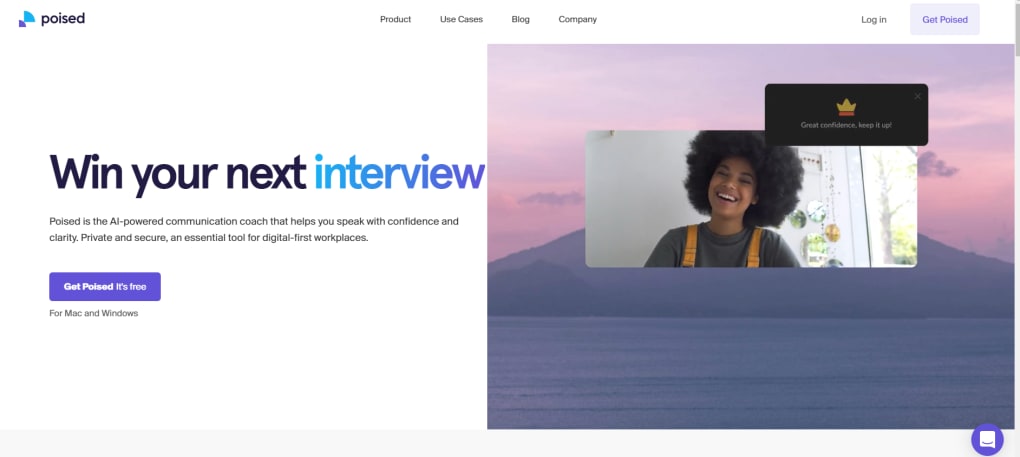
- Live On‑Screen Feedback: Real‑time visual cues alert you to filler words, monotone delivery, and pacing issues as they happen.
- Post‑Meeting Performance Report: A comprehensive dashboard grades tone, clarity, empathy, eye contact, interruptions, and storytelling.
- Emotion & Empathy Detection: AI analyzes facial expressions and vocal intonation to assess how well you convey empathy and confidence.
- Customizable Coaching Settings: Adjust sensitivity levels for filler word detection, speed alerts, and visual cue placement to match your comfort.
- Multi‑Platform Integration: Seamlessly works with Google Meet, Microsoft Teams, Zoom, Webex, and other major video‑conference tools.
- Progress Tracking & Goal Setting: Track weekly trends, set improvement targets, and receive personalized tips based on historical data.
- Secure Cloud Storage: All recordings and analytics are encrypted and stored in compliance with GDPR and CCPA standards.
How Poised Improves Specific Communication Skills
When you speak, the AI monitors acoustic features such as volume, pitch variance, and speech rate. If you begin to use filler words like “um” or “like,” a subtle icon appears in the corner of your screen, prompting you to pause and collect your thoughts. Simultaneously, computer‑vision tracks your eye gaze, ensuring you maintain a natural level of eye contact with the camera—crucial for building trust in remote settings. After the call, the report visualizes these metrics on easy‑to‑read graphs, comparing your performance to industry benchmarks. The storytelling module evaluates narrative structure, highlighting moments where you could have added a hook or a more compelling anecdote.
Beyond basic metrics, Poised’s emotion detection layer adds a nuanced dimension to the feedback. By analyzing micro‑expressions and vocal timbre, the system can infer whether you sounded enthusiastic, concerned, or neutral at key moments. This insight helps you align your emotional delivery with the message you intend to convey, a skill especially valuable for sales pitches, training sessions, and leadership briefings. The AI also flags moments of overlapping speech or interruptions, suggesting strategies to manage turn‑taking more gracefully. All these data points are aggregated into a single “Communication Score” that updates after each meeting, giving you a clear, quantifiable path toward improvement.
Finally, Poised’s customization options let you prioritize the metrics that matter most to your role. A sales professional might focus on persuasive language and confidence, while an educator may emphasize clarity and empathy. By tailoring the feedback engine, Poised becomes a personal coach that evolves alongside your career, ensuring that the insights remain relevant and actionable over the long term.
Installation, Usage & Compatibility
Step‑by‑Step Installation Guide
- Visit the official Poised website and click the “Start Free Trial” button.
- Enter your email address and create a secure password. You’ll receive a verification link to confirm your account.
- Download the Poised browser extension for Chrome, Edge, or Firefox. The extension is required to inject the AI overlay into supported video‑conference apps.
- After the extension installs, open it and sign in with the credentials you created. Poised will request permission to access your microphone and webcam—this is essential for real‑time analysis.
- Launch your preferred video‑conference platform (e.g., Google Meet). A small Poised icon will appear in the meeting toolbar, indicating that the AI coach is active and ready to provide feedback.
Using Poised During a Meeting
Once the extension is active, Poised runs silently in the background. If you enable “Live Feedback,” a translucent panel appears at the top‑right of your screen, showing instant alerts for filler words, speech speed, and tone variations. You can toggle this panel on or off at any time using a keyboard shortcut (default: Ctrl + Shift + P). For users who prefer a less intrusive experience, you can disable live cues and rely solely on the post‑meeting report, which is automatically generated and emailed within 24 hours.
Poised also offers a “Focus Mode” that temporarily mutes visual alerts while you are delivering a critical segment of your presentation. In this mode, the AI continues to collect data silently and adds any observations to the end‑of‑call report. This flexibility ensures that you can maintain a professional appearance without distracting your audience, while still benefiting from comprehensive analytics afterward.
Supported Operating Systems (itemprop="operatingSystem")
Poised is compatible with the major desktop operating systems:
- Windows 10 and later (64‑bit)
- macOS 11 (Big Sur) and later
- Linux distributions (Ubuntu 20.04+, Debian, Fedora) via Chrome or Chromium‑based browsers
Mobile support is currently limited to the Poised web portal, allowing you to view post‑meeting analytics on iOS and Android devices, but live feedback is only available on desktop browsers at this time. Future updates are slated to bring native mobile extensions, expanding the real‑time coaching experience to smartphones and tablets.
Pros, Cons, Frequently Asked Questions & Review Summary
Pros
- Real‑time, on‑screen feedback helps you correct habits instantly.
- Comprehensive post‑meeting analytics cover both verbal and non‑verbal cues.
- Works with all major video‑conference platforms without needing separate installations.
- Secure, GDPR‑compliant data handling ensures privacy.
- Free trial lets you test core features before subscribing.
- Customizable coaching settings let you focus on the metrics that matter most to your role.
- Progress tracking and goal‑setting features provide a clear roadmap for improvement.
Cons
- Live feedback can lag on lower‑end hardware or unstable internet connections.
- Some alerts appear after the spoken error, requiring users to backtrack mentally.
- Mobile live coaching is not yet available.
- Advanced analytics (e.g., emotion detection) are only accessible on higher‑tier subscription plans.
- The browser extension may conflict with ad‑blockers or other privacy extensions, requiring additional configuration.
FAQ (itemtype="https://schema.org/FAQPage")
Does Poised record my meetings?
Poised does not store full video recordings. It captures audio and visual cues only for the purpose of analysis, and all data is encrypted and deleted after the report is generated.
Can I use Poised with a corporate Zoom account?
Yes. Poised works with personal, corporate, and educational Zoom accounts as long as the browser extension has permission to access the meeting window.
What is the cost after the free trial?
Poised offers a monthly plan at $19.99 per month or an annual plan at $199 per year, which provides a 2‑month discount. Enterprise pricing is available on request.
Is Poised compatible with Linux?
Yes, Poised works on Linux through Chrome or Chromium‑based browsers. All features are available as long as the browser version is up‑to‑date.
How does Poised handle GDPR and data privacy?
All user data is encrypted in transit and at rest. Poised stores only the analytical metadata needed for reports and deletes raw audio/video snippets after processing, complying with GDPR, CCPA, and other regional regulations.
Can I customize the sensitivity of the AI alerts?
Yes. Within the Poised settings panel you can adjust the detection thresholds for filler words, speech speed, and visual cue placement, allowing a more tailored coaching experience.
Review Summary (itemprop="review")
Poised delivers a compelling blend of real‑time coaching and post‑meeting insights that can dramatically improve virtual communication. While occasional latency and post‑error alerts can be distracting, the depth of analysis—especially the emotion and empathy metrics—sets it apart from generic meeting recorders. For professionals who rely on video calls daily, the ROI is clear: better engagement, fewer filler words, and a measurable path to becoming a more confident presenter.
Rating: 4.5/5
Conclusion & Call to Action
In a world where remote collaboration is the norm, the ability to speak with clarity, confidence, and empathy can be a decisive competitive advantage. Poised equips you with the AI‑driven tools to transform every virtual meeting into a practice ground for excellence. Whether you’re a sales leader, educator, team manager, or solo entrepreneur, the instant feedback and detailed post‑meeting reports help you refine your delivery without hiring an external coach.
Take advantage of the free trial today, experience the live on‑screen cues, and see how a few minutes of data‑backed insight can elevate your professional presence. The platform’s secure architecture, cross‑platform compatibility, and flexible pricing make it a smart choice for individuals and organizations alike. Don’t let hidden communication habits hold you back—download Poised now, start your trial, and step into every meeting fully prepared to impress.



.png)



